FHA Variable Income: Overtime, Bonus, Shift Diff - Step-by-Step Guide
Variable income is one of the biggest reasons files go suspense: overtime drops, bonus history is unclear, shift differential isn’t documented, or the calculation isn’t consistent. This guide walks you through a practical, underwriting-style approach to FHA variable income - and shows how to turn it into a repeatable workflow that saves time, reduces conditions, and improves pull-through.
1. What counts as “variable income” (and why it’s tricky)
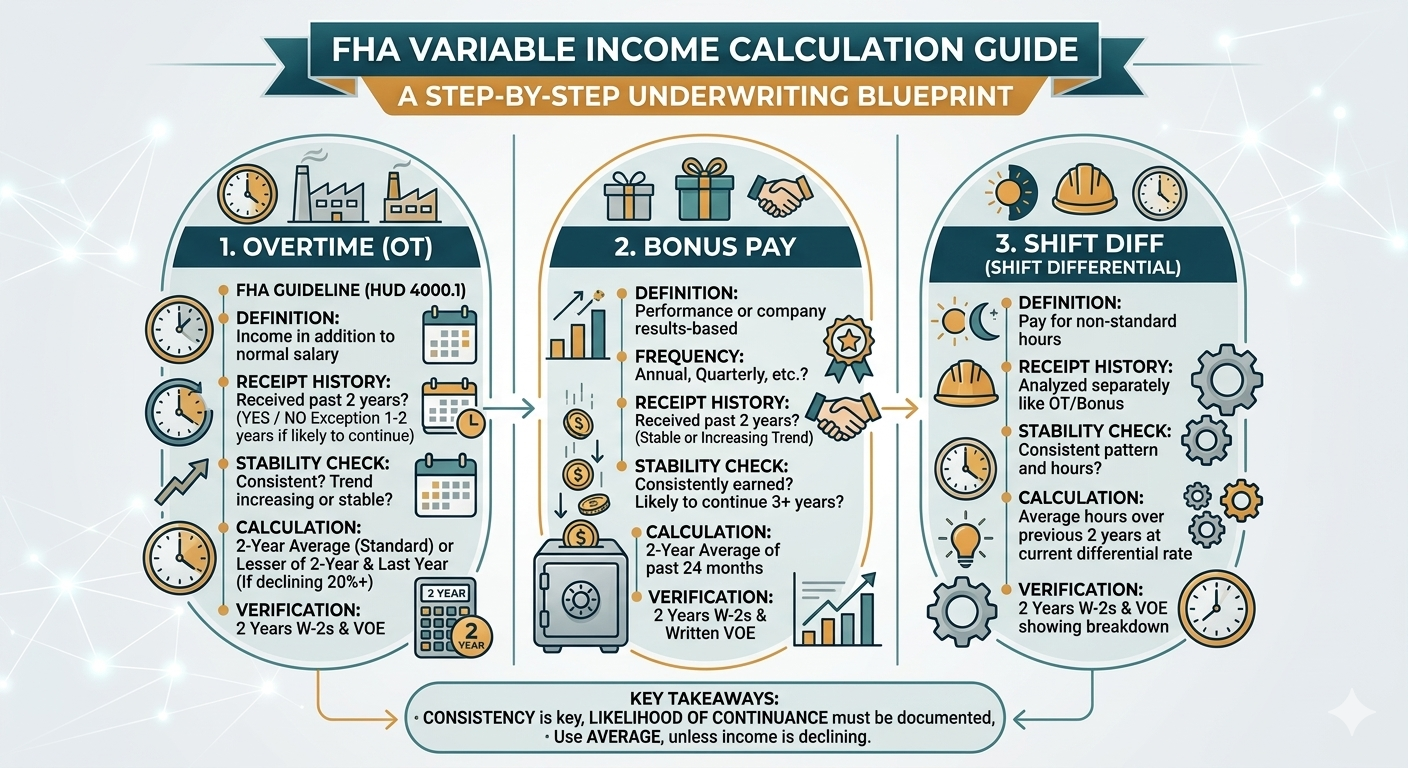
In practical underwriting terms, variable income is any income that can change month to month and requires history + stability review before it can be used confidently. The most common FHA scenarios:
Overtime
Hours vary; overtime can drop suddenly. Needs history + trend review.
Bonus / Commission
Often seasonal or performance-based. Requires sufficient history and consistency.
Shift Differential
Can look like “extra pay” but may depend on schedule/role and can change.
2. Documents you typically need (so you don’t get suspense)
A clean variable-income package is not “more documents.” It’s the right documents, early. Most suspense conditions appear because the file doesn’t clearly prove: history + likelihood of continuance + stable trend.
| Income Type | Common Docs | What UW is trying to prove |
|---|---|---|
| Overtime | Recent pay stubs + W-2s (or year-end totals); sometimes VOE | History + stable trend (not sharply declining) |
| Bonus | Pay stubs showing YTD bonus + W-2s; VOE if needed | Sufficient history; recurring, not one-time |
| Shift Diff | Pay stubs + employer explanation/VOE if unclear | Ongoing pay component tied to role/schedule |
3. Step-by-step calculation workflow
Here’s a clean, repeatable workflow your team can use on every variable-income file. The goal: produce an income number with math + rationale that a UW can validate quickly.
- Separate base vs variable components
Identify base pay and each variable line (overtime, bonus, shift diff, commission). - Confirm history window
Use an appropriate lookback window based on documentation available and underwriting policy (common practice is 12–24 months depending on stability and program requirements). - Calculate an annualized figure from current YTD
Convert YTD variable income to an annualized run-rate based on pay period and time elapsed. - Compare current run-rate to prior year(s)
If current trend is down, you typically need a more conservative approach or supporting explanation. - Choose the qualifying monthly income
Conservative rule of thumb: use the lower, stable figure when trends conflict. - Document rationale + generate conditions
Explain what you used, what you excluded, why, and what’s needed to support inclusion.
4. Worked examples (overtime, bonus, shift diff)
Below are simplified examples to show the mechanics. Real files can be more complex, but the logic stays the same.
Example A: Overtime (stable)
Use history + current trend to pick a defensible monthly figure.
Prior Year Overtime (W-2): $6,000
Current YTD Overtime: $3,600 (as of month 9)

Current Run-Rate (annualized) = 3,600 / 9 * 12 = $4,800

Conservative Qualifying Overtime = lower of (prior year, run-rate) = $4,800
Monthly Qualifying Overtime = 4,800 / 12 = $400
If the run-rate is lower than the prior year, many teams use the lower number unless there’s evidence the decline is temporary.
Example B: Bonus (declining)
Declining variable income usually triggers conditions or conservative treatment.
Prior Year Bonus (W-2): $10,000
Current YTD Bonus: $4,000 (as of month 9)

Run-Rate (annualized) = 4,000 / 9 * 12 = $5,333

Because bonus is materially declining:
- Use conservative qualifying bonus = $5,333 (or lower if policy requires)
- Condition: provide explanation and/or additional history to support continuance
Bonus income is often where “approved → suspense” happens when the trend is down and the file lacks explanation.
Example C: Shift Differential (consistent add-on)
Treat as variable component that must be proven stable and continuing.
Shift Diff appears as separate line item each pay period.
Current YTD Shift Diff: $2,250 (as of month 9)

Run-Rate (annualized) = 2,250 / 9 * 12 = $3,000
Monthly Qualifying Shift Diff = 3,000 / 12 = $250

Condition (if needed): VOE or employer note confirming shift diff is expected to continue.
If shift diff is tied to a temporary schedule change, treat it conservatively or exclude unless continuance is documented.
5. Red flags that trigger conditions
These are the most common reasons variable income goes suspense:
- Declining trend vs prior year without explanation
- Insufficient history to establish consistency
- Recent job change affecting overtime/bonus eligibility
- Inconsistent pay periods or incomplete YTD documentation
- Variable income included as “base” (misclassification)
6. Smart Conditions checklist (copy/paste)
Use these as standardized conditions to keep files consistent across teams:
- Overtime: Provide sufficient history of overtime income and documentation to support continuance; explain any decline vs prior year.
- Bonus: Provide bonus history and documentation to support recurring receipt; address declining trend if applicable.
- Shift Differential: Provide documentation (or VOE) confirming shift differential is expected to continue.
- Documentation completeness: Provide missing pay stubs/W-2s needed to support YTD and prior-year totals.
- Employment changes: Provide explanation for any recent job change affecting variable income.
7. ROI: why doing this right saves real money
Variable income isn’t just a “guideline challenge.” It’s an economics problem. When overtime/bonus/shift diff is handled inconsistently, you get:
- More income-driven suspense conditions
- More re-review touches (UW reopens the file multiple times)
- Longer time to CTC
- Higher cost per loan (expensive minutes × more touches)
The ROI of standardizing variable income comes from reducing: UW minutes + touches + suspense days. That compounds fast across monthly volume.
Upload one FHA loan with overtime/bonus/shift diff. Rapidio will return a guideline-ready income report plus Smart Conditions - so you can compare it to your current spreadsheet process.